
How to Make a Video From a Topic
You name a topic. Your agent researches it on the web, writes the spoken narration itself, and Cliptude does the rest: voice, footage, graphics, captions and the render. This is the mode for "make me a video about X" when you have no script, voiceover or recording.
At a glance
- You bring: a topic and, optionally, a saved template for the look.
- Your agent brings: the research and the narration script.
- Cliptude does: voice, footage, graphics, captions and the render.
- Price: set by the template's voice and model tier. Ask for
estimate_creditsfirst. It creates nothing and tells you the cost and your balance. - Length: 6 minutes and up.
1. Connect your agent and install the skills
Any agent that speaks MCP works: Claude, ChatGPT, Claude Code, Codex, Cursor and others. Connect it to the Cliptude MCP server and sign in, or use the CLI if your agent has no MCP. In Claude and ChatGPT, Cliptude's tools open pickers and cards inside the chat. Agents that show no widgets, such as Claude Code, Codex and Cursor, give you a cliptude.com/pick link with the same picker instead.
https://mcp.cliptude.com/mcp

npm i -g @cliptude/cli
cliptude auth login

npx skills add cliptude/cliptude
Connection steps for each agent are in the API docs. The skills tell the agent the workflow, so you don't have to explain it.
2. Pick a template
Style lives in a saved template: format, voice, language, music, background, style and model tier. The agent starts with yours: list_templates, which Claude and ChatGPT show as a gallery to pick from. If none fits, it builds one with the pickers, one at a time (voice, then the presenter or character, then music, background and style), and saves it with create_template. Every video is 16:9.
- Cinder (
high): still pictures and motion graphics only, no video clips. - Caldera (
pro): adds sourced video clips. Choose this when you want moving footage.
3. Brief your agent
Copy this prompt, fill in the parts in [brackets] and paste it into your agent.
Connect the Cliptude MCP server at https://mcp.cliptude.com/mcp and sign in. If you can't use MCP, install the CLI with `npm i -g @cliptude/cli` and run `cliptude auth login`. Then install the Cliptude skills: `npx skills add cliptude/cliptude`.

Make a [8-10]-minute video about [topic] using my [template name] template.

Follow the cliptude-script skill: run 3 to 6 web searches, keep only verified facts, and write the spoken narration yourself to the word budget for that length. Never pass the title as the prompt.

Call estimate_credits with the same template and script and show me the cost and my balance before you create the job. Then create the job with the script, and poll get_job until it is completed or failed.
The agent stops to show you the cost before anything is queued.
In Claude or ChatGPT: pick the template, then confirm
Connect the Cliptude MCP server (https://mcp.cliptude.com/mcp) and ask your agent for a video. It starts
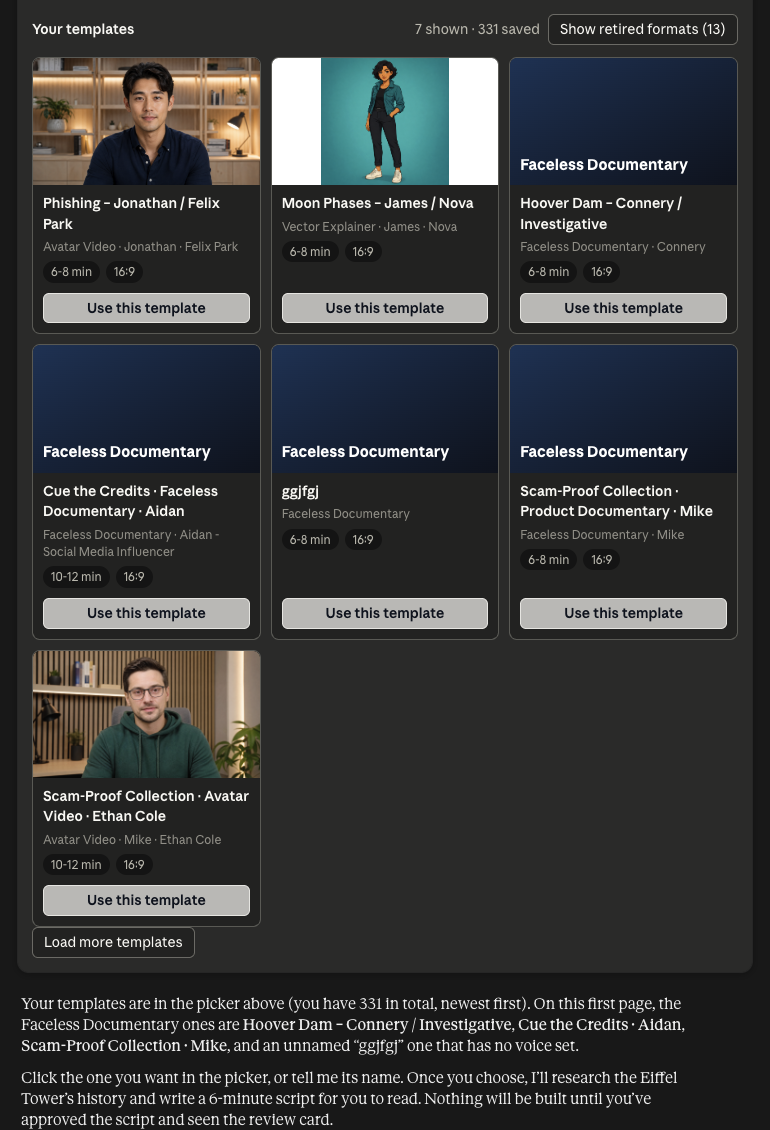
with your saved templates: in Claude and ChatGPT, list_templates shows them as a gallery. Avatar Video
cards show the presenter and Vector Explainer cards the character. Load more templates
shows the rest, and templates in retired formats stay hidden behind a button. Click
Use this template on the one you want.
If none fits, the agent builds a new one with the pickers, one at a time: voice, then the presenter (Avatar Video)
or character (Vector Explainer), then music, background and style. create_template and
get_template show the result as a template card with every setting, plus
Make a video with this template and Change something.
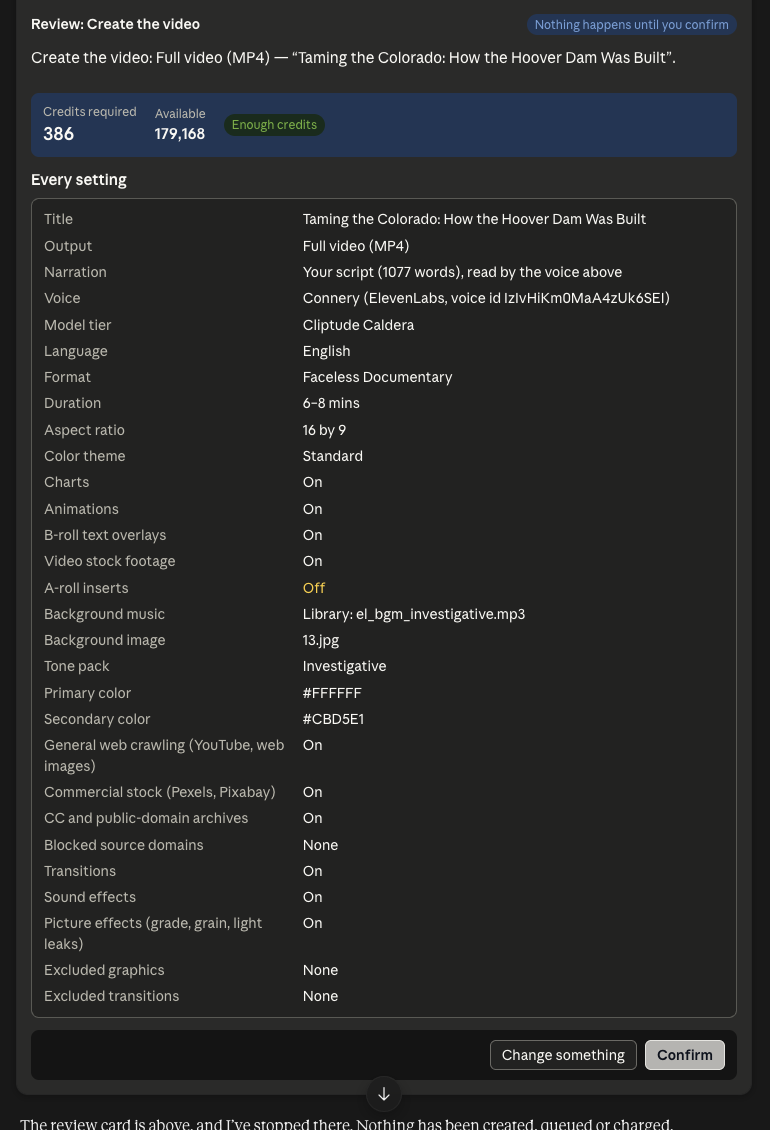
Before anything is created or charged, the agent shows the review card: every setting, any warnings, a checkbox for anything you turned off, and the credits. The Script (N words) tab holds the script. Nothing happens until you click Confirm.
In Claude a click saves your pick on Cliptude and the picker says "Saved. Type next in the chat to continue."
Type next and the agent carries on with it. In ChatGPT the pick is sent as your next message.
Claude Code, Codex, Cursor and other agents that show no widgets give you a cliptude.com/pick link with the same
picker instead. It works once, for 15 minutes, and only
for you when you are signed in. The agent reads the result with get_pick. From a terminal:
cliptude pick <pick_id> --url <link> opens it and waits.
Setup for each agent: Claude, ChatGPT, Claude Code, or any other MCP agent.
4. What happens next
- Research. The agent searches for current facts: statistics, dates, names and recent developments. It leaves out anything it can't verify.
- Script. It writes narration to a word budget that matches the length you asked for, in spoken words only.
- Quote.
estimate_creditsprices the exact template and script. - Review card.
create_jobfirst returns a review and creates nothing: every setting, any warnings and the credits. In Claude and ChatGPT it shows as a card with a Script tab and a Confirm button. Nothing is queued or charged until you confirm. - Create. After you confirm,
create_jobreturns at once with the job queued. The agent pollsget_job. A job takes about 10 to 40 minutes. - Done. You get the MP4 link. To change it afterwards, see Revise Mode.
5. Script, brief or title?
There are three ways to give Cliptude the words, and one that never works.
- The agent writes a full script and passes it as
script. Cliptude voices it unchanged. This is the default and gives the best result. - You want Cliptude to write it. Tell the agent so. It passes a researched brief as
prompt: audience, angle and must-include facts. - Never the title. A prompt that only repeats the title skips Cliptude's own research and gives a thin video.
6. Good to know
- Script length runs from 880 to 9,270 words, about 6 to 60 minutes. Details are on the custom script page.
- Not enough credits returns an error and queues nothing. A free account may need a paid plan.
- Want the agent to direct every shot? See How to Make Documentaries on Claude.