
Black Friday · 70% off
Cliptude Unlimited: $999 $299 one-time
Enter code BLACKFRIDAY at checkout to take 70% off.
Make as many videos as you want.
Pay Cliptude once.
Cliptude Unlimited is the Cliptude desktop app for macOS, Windows and Linux. It makes the same documentaries, top-10 countdowns, explainers and avatar videos as cliptude.com, with the timeline editor built in — but it runs on your computer, with your own API keys, and there is no monthly plan and no credit cap.
Black Friday: code BLACKFRIDAY takes 70% off $999 at checkout · one-time payment · one computer · installer and license key sent after purchase
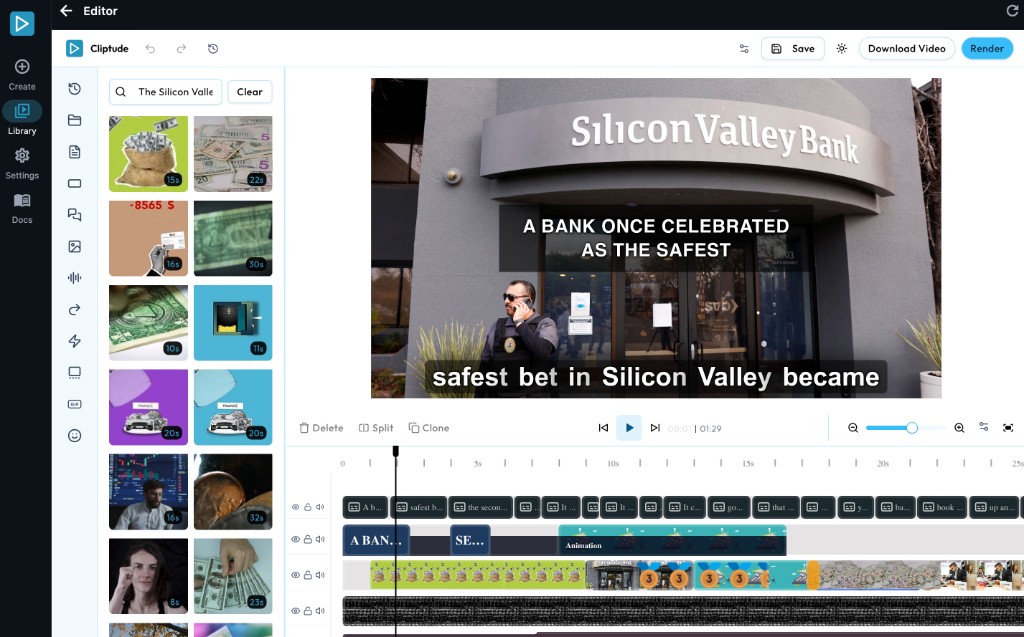
The built-in editor: trim, swap footage, fix captions and re-render on your machine
$999 $299
paid once with code BLACKFRIDAY
0
Cliptude credits needed
~$3–6
typical API cost of a longer video
3 OS
macOS · Windows · Linux
Videos made with Cliptude
The desktop app makes the same formats, with the same editing, as these samples.
How it works
From payment to your first video in four steps.
-
1
Buy
Pay $999 once — $299 with Black Friday code BLACKFRIDAY. We email your license key and send the installer for your operating system.
-
2
Install and activate
Install the app and enter your key. Each key activates on one computer.
-
3
Add your API keys
Paste in keys for the services you use — voice, AI models, stock footage. You pay those providers directly.
-
4
Make videos
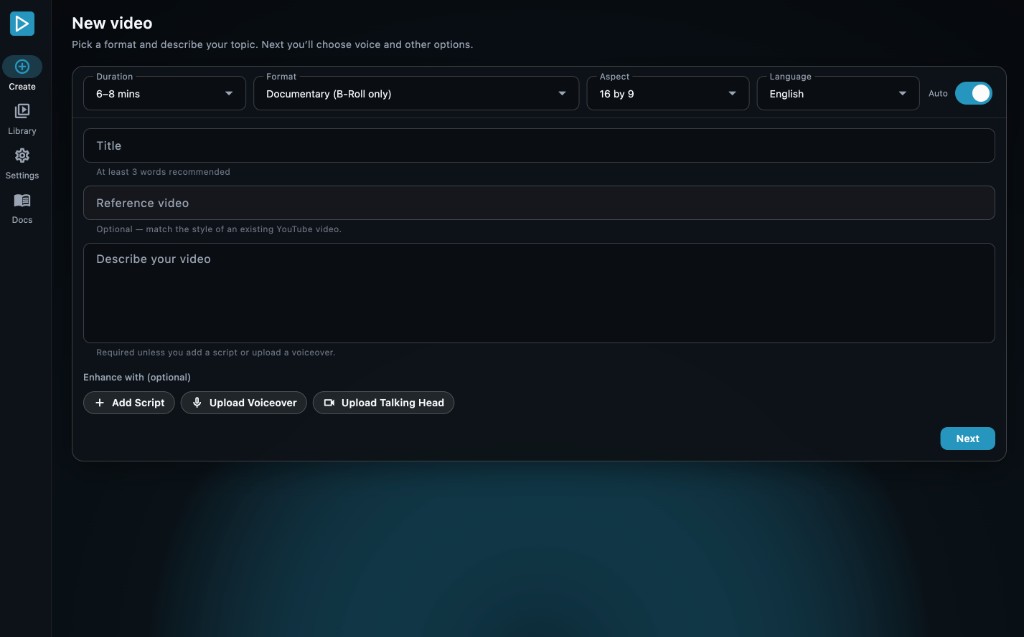
Pick a format, give it a topic or script, and generate. The finished MP4 and project stay on your computer.
Inside the app
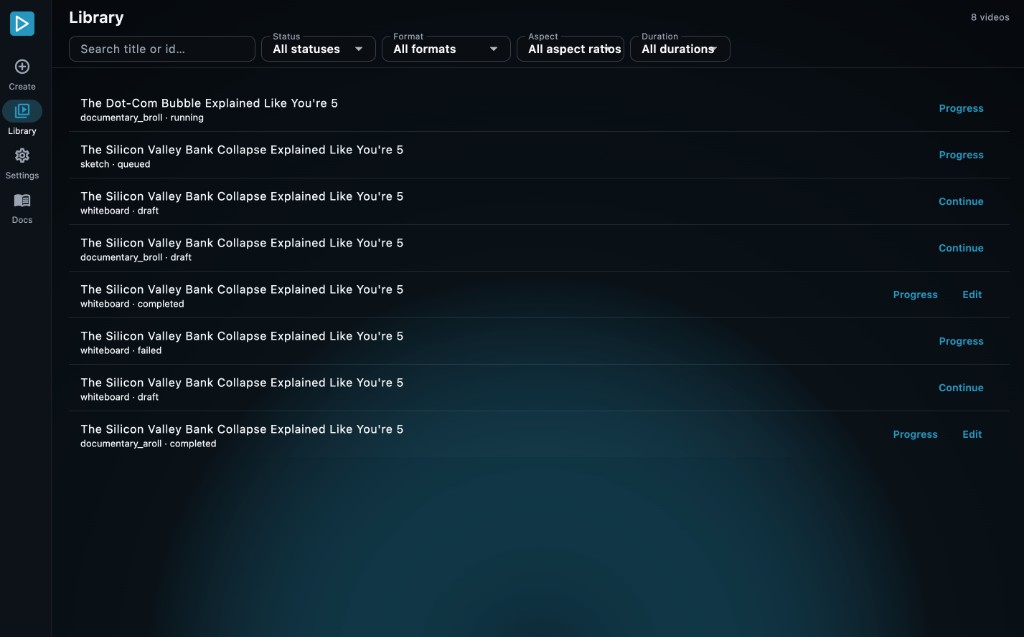
Create, keep track of every video, and edit the result — all in one desktop app.
What you pay
To Cliptude: $999, once ($299 with code BLACKFRIDAY for Black Friday). No subscription is needed to keep using the version you receive, and the app never asks for Cliptude credits.
To the AI services you use: what you use. The app calls services like OpenAI, Anthropic and ElevenLabs with your own keys, and they bill you directly. A longer video typically costs about $3–6 in these calls. HeyGen avatars are extra, at roughly $3–4 per minute of avatar on screen.
That is the whole limit: you can make as many videos as you are willing to pay those services for.
API keys the app uses
- ElevenLabs or Minimax
- Voiceover
- OpenAI
- GPT models
- Anthropic
- Claude models
- OpenRouter
- Backup for OpenAI
- Kie.ai
- Thumbnails and images
- HeyGen
- Avatar videos
- Pexels and Pixabay
- Stock footage
- Freesound
- Sound effects
- Giphy
- GIFs
- Webshare
- Proxies for finding footage
Provider prices are set by those companies and can change. Full setup guide
Is it right for you?
Unlimited is a big one-time purchase, so here is the honest version.
A good fit if you
- ✓Publish a lot of long videos and a monthly credit plan keeps running out
- ✓Want finished videos and projects kept on your own drive
- ✓Are happy to set up a few API accounts and pay them directly
- ✓Have a computer you can leave rendering for a few hours
Not a fit if you
- ✕Need videos fast — a 10-minute video takes about 2–4 hours on your machine
- ✕Only make a few videos a month — a cloud plan costs less
- ✕Want the source code, to customise the app, or to host it for others
- ✕Need it on several computers — each license covers one
What your computer needs
Operating system
- macOS (Apple Silicon and Intel)
- Windows
- Linux
Hardware
Minimum
- 8 CPU cores
- 8 GB RAM
- 250 GB free
Recommended
- 16+ CPU cores
- 16 GB RAM
- 500 GB–1 TB free
Also
- An internet connection — for the AI services, footage and license check
- A GPU is optional; NVIDIA or Apple Silicon makes rendering faster
- Laptops with 256 GB total storage won't have enough room
See the quality before you buy
The desktop app makes the same videos as cliptude.com. Watch the sample videos, or make a few of your own on a cloud plan first, so you know exactly what you're getting.
Questions
What exactly do I get?
A permanent license and the desktop app installer for your operating system. After payment we send the installer and email your license key.
Is there a monthly fee?
Not to Cliptude. You keep using the version you receive with no subscription. You do pay the AI services you connect for what you use.
Does it include cliptude.com credits?
No. Unlimited is separate from the cloud plans and doesn't add credits to your cliptude.com account. Videos are made on your computer with your own keys.
How many computers can I use it on?
One. Each license key activates once, on one computer. Another computer needs another license.
Can I use the videos commercially?
The license covers personal use and internal business use on one computer, including videos for your own channels and projects. You may not resell, share or host the app for other people.
Do I get the source code?
No. It's a compiled app provided as is, and it can't be modified or extended.
Does it work offline?
No. Rendering and editing happen on your computer, but the app needs the internet to call the AI services, download footage and check your license with cliptude.com.
Will I get updates?
You keep the version you receive; no update subscription is required. If we send you a newer build later, you can install it.
More detail, including the full license, is in the Cliptude Unlimited guide.
One payment. Your computer. No credit cap.
Black Friday: 70% off with code BLACKFRIDAY at checkout — $299 instead of $999, once, for the Cliptude desktop app on one computer. Bring your own API keys and make as many videos as you like.