
Cliptude Unlimited
A native desktop app you install on your own computer for personal use. After purchase, we share the installer for your operating system.
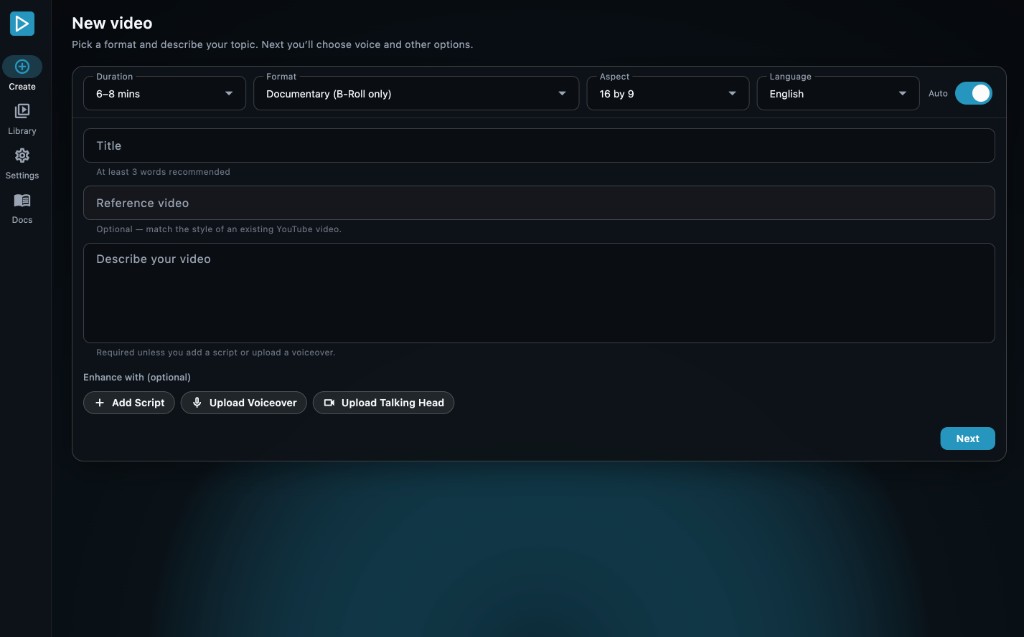
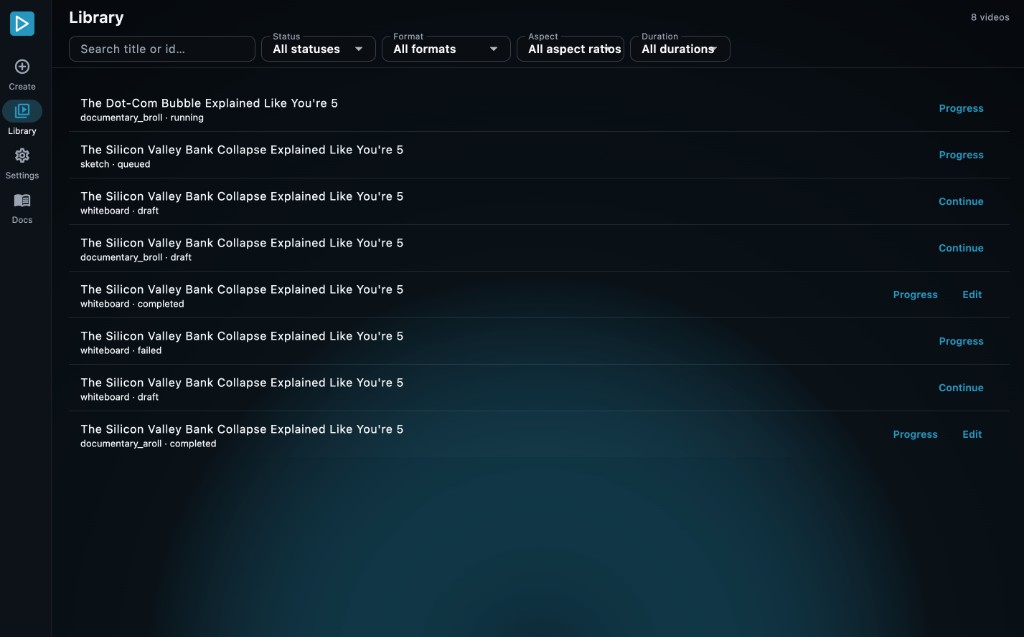
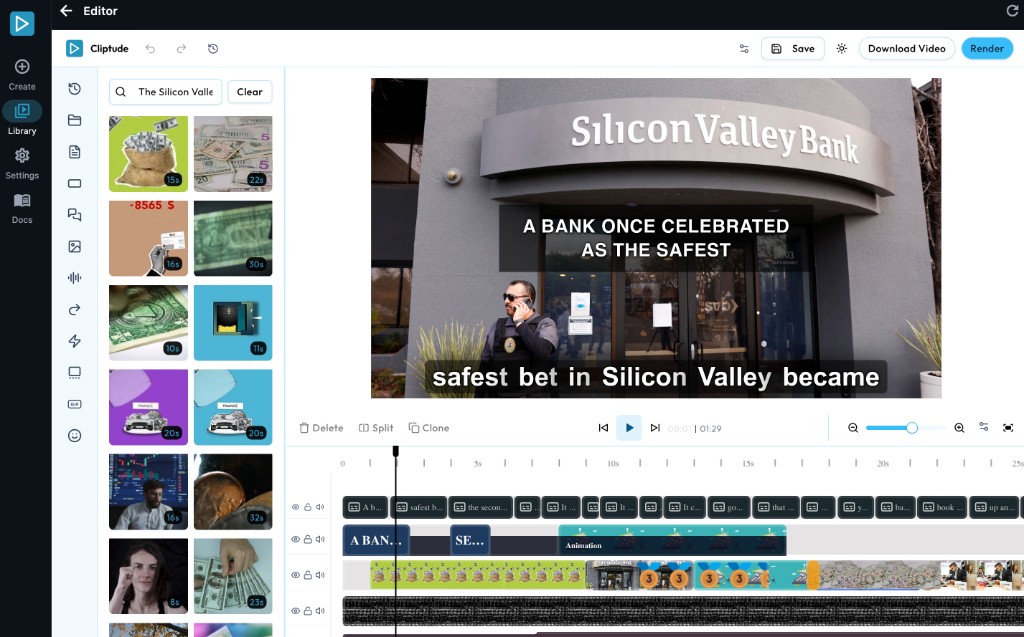
Try before you buy
Cliptude Unlimited is a $999 one-time purchase. Before buying, watch the sample videos on the docs — that is the editing style and quality level you should expect from the desktop app too. You can also create your own samples using the Starter plan on cliptude.com to make sure you are happy with the video editing quality.
Pricing & Ongoing Costs
Cliptude Unlimited is a one-time purchase of $999. After you pay, there is no required recurring payment to Cliptude — you own a perpetual license to run the desktop app on your machine for personal use.
License
$999 one-time
Desktop app for your operating system. No monthly subscription required to keep using the version you received.
Third-party services are separate. The desktop app runs on your computer, but video generation still calls external APIs. You pay those providers directly — for example OpenAI, Anthropic, ElevenLabs, HeyGen, Kie.ai, Pixabay, and Pexels. See Required Services for the keys you will need to add in the app.
There is no Cliptude credit cap on Unlimited — you can create as many videos as you are willing to pay for through those third-party services.
Getting Started
After you purchase, we share the desktop installer for your operating system (macOS, Windows, or Linux). Follow these four steps:
-
1
Install
Download the installer we send you for your OS and install the Cliptude desktop app on your computer.
-
2
Activate with your license
Open the app and activate it with the license key sent to your email after purchase. Each key can be activated once for a single machine.
-
3
Add your API keys
In the app settings, add the API keys for the services you use (voice, LLMs, thumbnails, stock footage, and so on). See Required Services.
-
4
Create video
Start a new video in the app, choose your format and options, and generate. Videos render on your machine.
License key (required)
Your license key is emailed after purchase. Keep it private. You activate it inside the desktop app so this install is bound to your machine. Video creation validates the license with https://cliptude.com.
What to Expect
Desktop app — provided as is
You receive a compiled desktop application for your operating system. You do not receive source code. The app is provided as is and cannot be edited, modified, customized, or extended. Install and run it as provided.
Personal use
The license is for your own personal use (or internal business use on a single machine). It is not for redistribution, resale, or hosting a public copy of Cliptude.
Unlimited videos, pay-as-you-go API usage
There is no monthly video quota from Cliptude. You can generate as many videos as you want, limited only by what you are willing to spend on third-party API usage (voiceover, LLM calls, stock footage, thumbnails, and so on). Your costs scale with how much you produce.
Generation time
Video generation runs locally on your machine and is not instant. A typical 10-minute video takes about 2–4 hours to complete, depending on your internet speed (for downloading footage and calling external APIs) and your computer specs (CPU, RAM, and whether you have a GPU for rendering). Faster hardware and a stable connection reduce wait times; weaker setups will take longer.
Requirements
Supported Platforms
- ✓ macOS (Apple Silicon and Intel)
- ✓ Windows
- ✓ Linux
After purchase we share the installer that matches your OS.
Hardware
Minimum
- 8 CPU cores
- 8 GB RAM
- 250 GB free disk
Recommended
- ~16+ CPU cores
- ~16 GB RAM
- 500 GB to 1 TB+ free
Disk figures above are free space available for Cliptude — not the total storage capacity of your computer.
Storage: Video generation and rendered outputs use a lot of disk space. We do not recommend machines with only 256 GB total storage — after the OS and your other files, you will not have enough free space. Plan for at least 500 GB to 1 TB+ free on the machine running Cliptude.
Any NVIDIA or macOS GPU helps increase rendering speed, but it is not required. Without one, videos still render.
Required Services
Add your API keys in the desktop app under Settings → API Keys (step 3 above):
ElevenLabs or Minimax
Voiceover generation
OpenAI
GPT models
Anthropic
Claude models
Kie.ai
Thumbnails and image generation
OpenRouter
OpenAI fallback
Webshare
Proxies for web scraping
HeyGen
Avatar video generation
Giphy
GIF API key
Freesound
Sound effects
Pixabay
B-roll footage
Pexels
B-roll footage
Frequently Asked Questions
What do I get when I buy Cliptude Unlimited?
A perpetual license and a desktop app installer for your operating system (macOS, Windows, or Linux). After purchase we share the installer and email your license key. You install the app, activate it, add your API keys, and create videos on your machine.
Is there a monthly fee?
No. Unlimited is a $999 one-time purchase. There is no required recurring payment to Cliptude to keep using the version you received. You still pay third-party API providers (OpenAI, ElevenLabs, Kie.ai, and so on) for whatever you use.
Do I get the source code? Can I edit or customize the app?
No. You receive a compiled desktop application provided as is. You do not receive source code and cannot modify, customize, reverse-engineer, or extend the software. Run it as provided.
Is this for personal use only?
Yes. The license is for your own personal use (or internal business use on a single machine). You may create videos for your own channels and projects. You may not redistribute the app, resell it, sublicense it, or host a public copy of Cliptude.
How many computers can I install it on?
One license activates on one machine. Each license key can be activated once. If you need another computer, purchase an additional license.
How do I get the installer and activate?
After payment, we share the installer for your OS and email your license key. Install the app, enter the key to activate, add your API keys in Settings, then create a video. See Required Services for which keys you need.
Are Cliptude cloud credits included?
No. Unlimited is not a cliptude.com cloud subscription and does not add website credits. Generation runs locally with your own API keys. There is no Cliptude credit cap — output is limited by what you spend with third-party providers.
Who pays for OpenAI, ElevenLabs, and other APIs?
You do. Create accounts with those providers, add the keys in the app, and pay them directly. Those costs are separate from the $999 license.
How much do LLM and HeyGen APIs cost for an avatar video?
LLM and other non-HeyGen APIs are typically about $3–6 for a longer video. HeyGen is extra, and it only bills the avatar minutes it actually generates, not the full runtime.
The Avatar sample videos (including the presenter in a hat and braces) are mixed with B-roll and graphics, not 100% talking head. The avatar is usually on screen about 30–40% of the clip. There is no exact percentage slider. Default Avatar Video aims for about 25–40% depending on length — a 30-minute video is typically about 7.5–9 minutes of avatar (around 25–30%). Avatar Intro Only limits HeyGen to the opening (about 5–8 seconds), then the rest stays documentary-style.
Approximate HeyGen API rates at 1080p (you pay HeyGen directly; their prices can change):
- Avatar IV Photo: about $3/min of avatar
- Avatar IV / V Studio / Digital Twin: about $4/min of avatar
Example: a 30-minute video with about 10 minutes of avatar, on top of the $3–6 for LLM and other APIs, is about $33–46 total with Avatar IV. Intro Only on that same 30-minute video is typically under $1 of HeyGen plus the $3–6.
How is this different from a normal Cliptude plan?
Cloud plans run on cliptude.com and use our credits and infrastructure. Unlimited is a desktop app on your computer with your own keys — no monthly Cliptude subscription, no cloud credit bucket.
Which operating systems are supported?
macOS (Apple Silicon and Intel), Windows, and Linux. We share the installer that matches your OS after purchase.
How long does video generation take?
It runs on your machine and is not instant. A typical 10-minute video takes about 2–4 hours, depending on internet speed (APIs and footage downloads) and CPU/RAM/GPU.
Do I need a GPU?
No. An NVIDIA or Apple Silicon GPU helps rendering go faster, but videos still render without one. More CPU cores and RAM also help.
Does the app need an internet connection?
Yes. The app needs internet for third-party APIs, downloading footage, and license validation with cliptude.com. Final assembly and rendering happen on your machine.
How much disk space do I need?
Plan for at least 250 GB free (minimum), ideally 500 GB to 1 TB+. Footage, renders, and project files add up quickly. Machines with only 256 GB total storage are not recommended.
Can I try quality before buying?
Yes. Watch the sample videos and use the Starter plan on cliptude.com so you know the editing style and quality before purchasing Unlimited.
Will I get software updates?
You keep the version we provide after purchase. There is no required updates subscription. If we share a newer build with you later, install that build as provided — still as is, without source access.
License
CLIPTUDE SOFTWARE LICENSE AGREEMENT
Copyright © 2026 Cliptude. All rights reserved.
PLEASE READ THIS LICENSE AGREEMENT CAREFULLY BEFORE USING THIS SOFTWARE.
BY INSTALLING OR RUNNING THIS SOFTWARE YOU AGREE TO BE BOUND BY THE TERMS OF THIS AGREEMENT.
1. GRANT OF LICENSE
Cliptude grants you a non-exclusive, non-transferable, limited license to install and use this software on a single computer (the "Licensed Machine") solely for your own personal or internal business purposes.
2. RESTRICTIONS
You may not:
- Copy, distribute, sublicense, sell, resell, or otherwise transfer this software or any portion of it to any third party;
- Modify, adapt, translate, reverse-engineer, decompile, disassemble, or create derivative works based on this software;
- Remove or alter any proprietary notices, labels, or marks on the software;
- Install or use this software on more than one computer without purchasing an additional license for each additional machine;
- Use this software to build a competing product or service;
- Host this on the public internet, as this will affect our SEO due to duplicate website content. Usage is only allowed locally on your Licensed Machine.
3. OWNERSHIP
This software is licensed, not sold. Cliptude retains all right, title, and interest in and to the software, including all intellectual property rights. Your rights to use the software are limited to those expressly granted in this Agreement.
4. NO WARRANTIES
THIS SOFTWARE IS PROVIDED "AS IS" WITHOUT WARRANTY OF ANY KIND, EXPRESS OR IMPLIED. TO THE MAXIMUM EXTENT PERMITTED BY APPLICABLE LAW, CLIPTUDE DISCLAIMS ALL WARRANTIES, INCLUDING BUT NOT LIMITED TO WARRANTIES OF MERCHANTABILITY, FITNESS FOR A PARTICULAR PURPOSE, AND NON-INFRINGEMENT. CLIPTUDE DOES NOT WARRANT THAT THE SOFTWARE WILL BE ERROR-FREE, UNINTERRUPTED, OR FREE OF SECURITY VULNERABILITIES. YOU MAY NOT EDIT OR MODIFY THE APPLICATION.
5. LIMITATION OF LIABILITY
TO THE MAXIMUM EXTENT PERMITTED BY APPLICABLE LAW, IN NO EVENT SHALL CLIPTUDE BE LIABLE FOR ANY INDIRECT, INCIDENTAL, SPECIAL, EXEMPLARY, OR CONSEQUENTIAL DAMAGES (INCLUDING BUT NOT LIMITED TO LOSS OF PROFITS, DATA, OR BUSINESS INTERRUPTION) ARISING OUT OF OR IN CONNECTION WITH THE USE OR INABILITY TO USE THIS SOFTWARE, EVEN IF CLIPTUDE HAS BEEN ADVISED OF THE POSSIBILITY OF SUCH DAMAGES.
IN NO EVENT SHALL CLIPTUDE'S TOTAL LIABILITY TO YOU EXCEED THE AMOUNT YOU PAID FOR THIS SOFTWARE LICENSE.
6. TERMINATION
This license is effective until terminated. It will terminate automatically without notice if you fail to comply with any term of this Agreement. Upon termination you must destroy all copies of the software in your possession.
7. GOVERNING LAW
This Agreement shall be governed by and construed in accordance with applicable law. Any disputes arising under this Agreement shall be subject to the exclusive jurisdiction of the courts of competent jurisdiction.
8. ENTIRE AGREEMENT
This Agreement constitutes the entire agreement between you and Cliptude with respect to the software and supersedes all prior or contemporaneous understandings regarding such subject matter.
By installing or using this software, you acknowledge that you have read this Agreement, understand it, and agree to be bound by its terms.