
How to Use Script-Only Mode
Sometimes you want the words first. In script-only mode Cliptude researches your topic and writes the narration, then stops. No voice is recorded and no video is built. When you like the script you continue the same job into an MP4.
At a glance
- You bring: a topic or brief and a template.
- Cliptude does: research and writes the script. Nothing else.
- Result: the script text on the job.
- Next step:
continue_jobturns the same job into the video. - Price: ask for
estimate_credits, and check the job after.
1. Connect your agent and install the skills
Any agent that speaks MCP works: Claude, ChatGPT, Claude Code, Codex, Cursor and others. Connect it to the Cliptude MCP server and sign in, or use the CLI if your agent has no MCP. In Claude and ChatGPT, Cliptude's tools open pickers and cards inside the chat. Agents that show no widgets, such as Claude Code, Codex and Cursor, give you a cliptude.com/pick link with the same picker instead.
https://mcp.cliptude.com/mcp

npm i -g @cliptude/cli
cliptude auth login

npx skills add cliptude/cliptude
Connection steps for each agent are in the API docs. The skills tell the agent the workflow, so you don't have to explain it.
2. Brief your agent
Copy this prompt and fill in the brackets.
Connect the Cliptude MCP server at https://mcp.cliptude.com/mcp and sign in. If you can't use MCP, install the CLI with `npm i -g @cliptude/cli` and run `cliptude auth login`. Then install the Cliptude skills: `npx skills add cliptude/cliptude`.

Write me the script only for a [8-10]-minute video about [topic] using my [template name] template. Use create_script, not create_job, and give it a brief with the audience, angle and must-include facts (not just the title).

Poll get_job until it is completed, then show me the script. Do not build the video. If I approve, call continue_job on the same job. Never start a second job.
In Claude or ChatGPT: pick the template, then confirm
Connect the Cliptude MCP server (https://mcp.cliptude.com/mcp) and ask your agent for a video. It starts
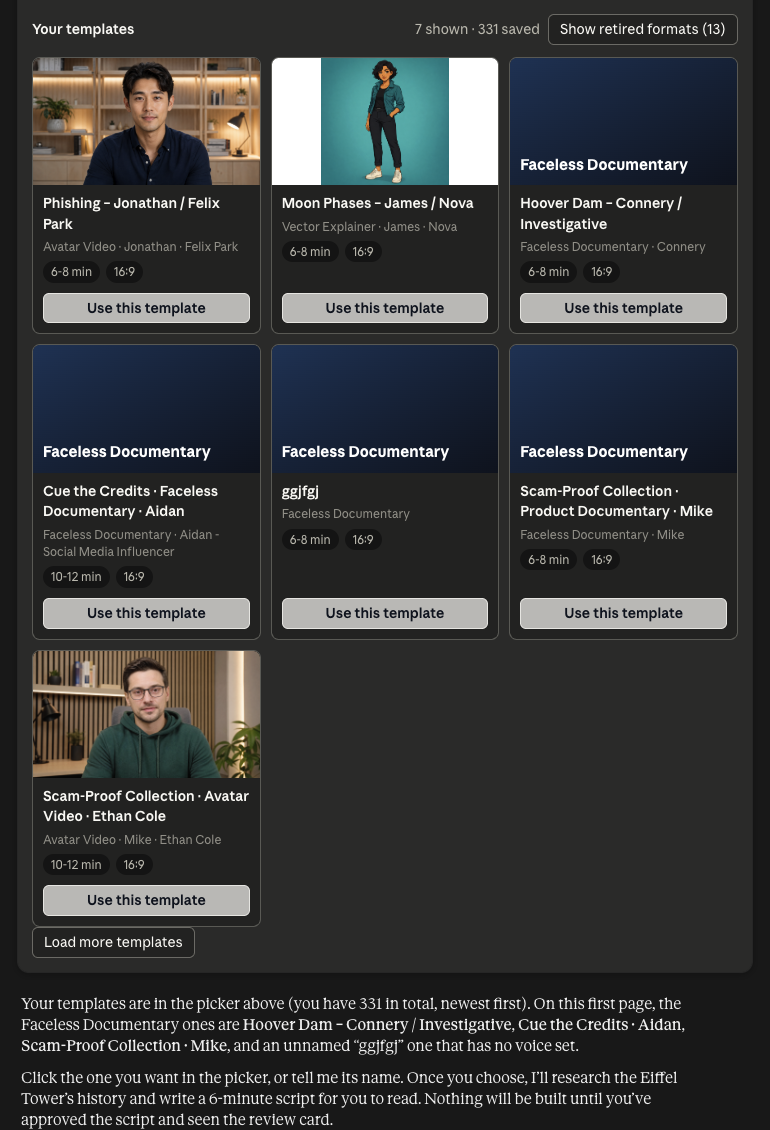
with your saved templates: in Claude and ChatGPT, list_templates shows them as a gallery. Avatar Video
cards show the presenter and Vector Explainer cards the character. Load more templates
shows the rest, and templates in retired formats stay hidden behind a button. Click
Use this template on the one you want.
If none fits, the agent builds a new one with the pickers, one at a time: voice, then the presenter (Avatar Video)
or character (Vector Explainer), then music, background and style. create_template and
get_template show the result as a template card with every setting, plus
Make a video with this template and Change something.
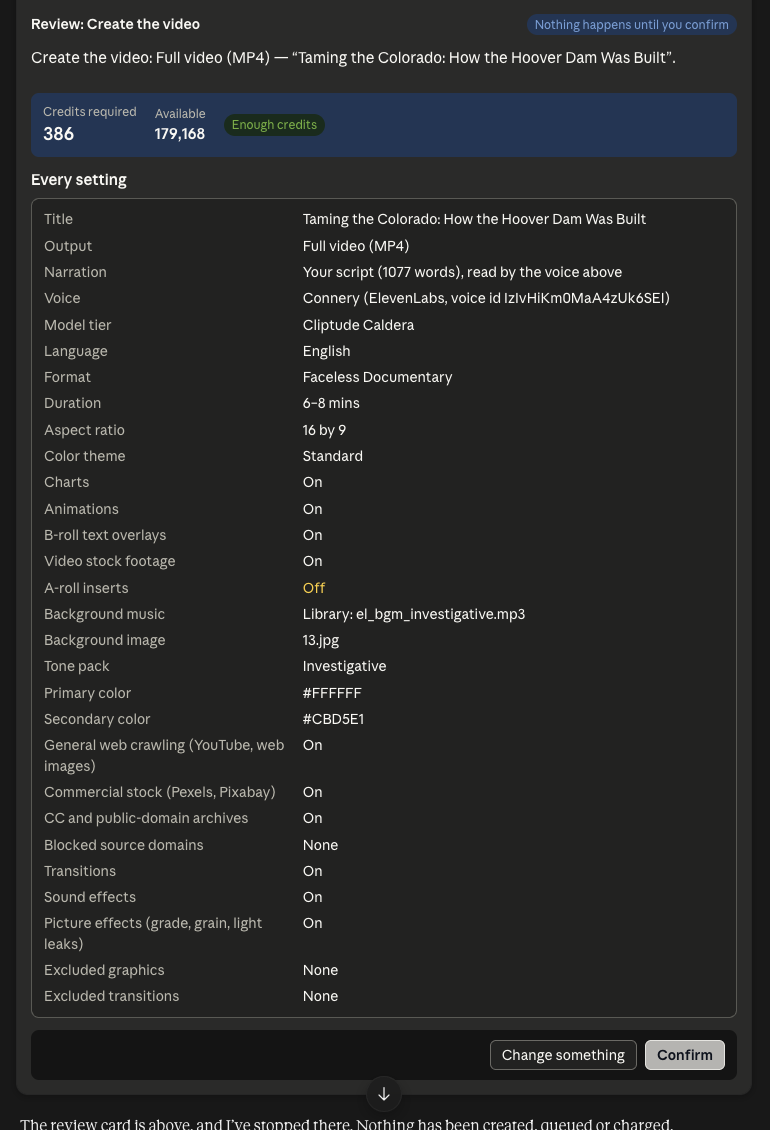
Before anything is created or charged, the agent shows the review card: every setting, any warnings, a checkbox for anything you turned off, and the credits. The Script (N words) tab holds the script. Nothing happens until you click Confirm.
In Claude a click saves your pick on Cliptude and the picker says "Saved. Type next in the chat to continue."
Type next and the agent carries on with it. In ChatGPT the pick is sent as your next message.
Claude Code, Codex, Cursor and other agents that show no widgets give you a cliptude.com/pick link with the same
picker instead. It works once, for 15 minutes, and only
for you when you are signed in. The agent reads the result with get_pick. From a terminal:
cliptude pick <pick_id> --url <link> opens it and waits.
Setup for each agent: Claude, ChatGPT, Claude Code, or any other MCP agent.
3. What happens next
- Review card.
create_scriptfirst returns a review and creates nothing: every setting, any warnings and the credits. In Claude and ChatGPT it shows as a card with a Script tab and a Confirm button. Nothing is queued or charged until you confirm. - Create. After you confirm,
create_script(CLIcliptude script) queues the job. - Wait. The agent polls
get_jobuntil it is completed. - Read. The script is on the job as
script. - Continue, or stop.
continue_job(CLIcliptude continue <job-id>) makes the MP4 on the same job id.
4. Good to know
- A job you can still continue shows
can_continueas true. - Always continue on the same job. A second job starts again from the beginning.
- Already have the script? Use Script Mode. Want the voice first? See Voiceover-Only Mode.