
Thumbnail Generation
A great thumbnail is key to a high click-through rate. Cliptude creates multiple options for you to choose from or test.
3 Variations for A/B Testing
For every video, our system generates 3 distinct thumbnail options. This allows you to pick the best one or run A/B tests on YouTube to maximize your views.
Style Matching
The AI mimics the style you choose or attempts to replicate the vibe of a reference YouTube thumbnail you provide.
Important: AI Limitations
Please note that AI image generation is experimental. While we strive for high quality:
- The style match is an approximation, not a pixel-perfect copy.
Quality is not guaranteed. We recommend reviewing all 3 options and selecting the one with the fewest errors.
Credit estimate on this step
The last wizard screen shows the generation estimate before you click Generate Video. That figure uses your selected model rate times expected duration (from uploaded media, script length, or the duration bucket), then adds a 10% buffer until voiceover is measured.
- Cliptude Cinder is 40 credits/min for documentary-style formats — stills and motion graphics only (no sourced video clips).
- Cliptude Caldera is 55 credits/min and mixes stills, sourced video, and motion graphics.
Some formats (Avatar Video and Vector Explainer with video animation) replace or add to that base rate. See the credits guide and model selection for the full tables.
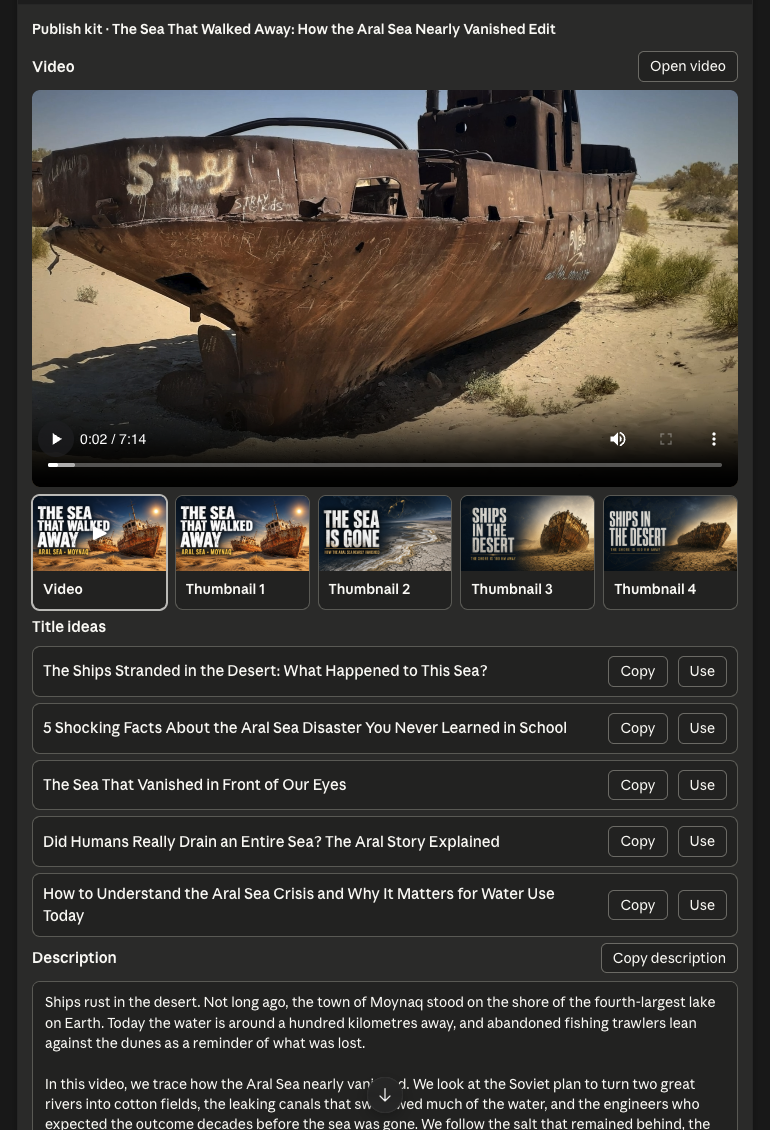
Thumbnails in the publish kit (Claude or ChatGPT)
When a video made through the Cliptude MCP server is ready, the agent calls show_publish_kit. In Claude
and ChatGPT it opens one card inside the chat: the video playing at the top, then its thumbnails, title ideas,
description, chapters and tags, each ready to copy. show_video plays the video on its own.
Claude Code, Codex, Cursor and other agents that show no widgets give you a cliptude.com/pick link with the same
publish kit instead. It works once, for 15 minutes, and only
for you when you are signed in. The agent reads the result with get_pick. From a terminal:
cliptude pick <pick_id> --url <link> opens it and waits.
Setup for each agent: Claude, ChatGPT, Claude Code, or any other MCP agent.