
Stick figure animation maker: how to make stickman animations, by hand or with AI
There are three ways to make a stick figure animation: draw every frame, pose a stick-figure rig joint by joint, or have AI draw it from a script. Cliptude does the third. Pick one of 12 stick figure characters (or upload your own), give it a topic or your script, and it writes the narration, voices it, draws every scene with that character and animates it into a 16:9 YouTube video of 6 minutes or more. This page shows a finished example scene by scene, then covers both routes: animating a stickman yourself, and making a whole narrated stick figure video with AI.
A stick figure animation made with Cliptude
This whole video came from one script: Cliptude voiced it, drew every scene with the stick figure Clyde, animated the scenes and added the maps, charts, music and captions.

The Wolf of Wall Street Scam Explained Like You're 5
Made with Vector Explainer, the built-in stick figure Clyde, colour scenes and moving-scene animation. Seven minutes on how the Stratton Oakmont pump and dump worked, told as a lemonade stand, with maps of Lake Success and Purchase, New York.
What is in the sample, scene by scene
The video runs 6:58 and has 1,054 spoken words. Cliptude cut it into 60 scenes, a new picture about every 7 seconds, and animated 57 of them into moving clips. On top of the scenes it placed about 40 graphics where the script called for them: counters for the dollar figures, timelines for the dates, bar charts comparing the sentence handed down with the time served, and street maps of Lake Success and Purchase, New York, where the two brokerages were based.
| Time | What the narration covers | What is on screen |
|---|---|---|
| 0:00 | The hook: he lied about a stock, made millions and served about 22 months. | A counter for the months served and a name card for Jordan Belfort. |
| 0:33 | Stratton Oakmont, a brokerage in Lake Success, New York. | A street map of Lake Success with the firm pinned. |
| 0:57 | It started in a friend's car dealership in Queens and was bought for about 250,000 dollars. | A timeline of how the firm started. |
| 1:11 | How the scam worked, told as a lemonade stand. | Scenes of one kid controlling the lemonade, friends hyping it, and the crowd left holding worthless cups. |
| 1:39 | What the SEC alleged about Steve Madden stock offerings. | A counter for the manipulations alleged; the narration flags it as an allegation, not a verdict. |
| 2:23 | The lesson: supply and pressure. | Kinetic text ending on the line "The price tells you nothing." |
| 2:48 | The chase: the 1992 SEC complaint and the industry bans. | A chapter card, a timeline of the dates and a counter for the amount the SEC alleged. |
| 3:34 | Monroe, a backup brokerage in Purchase, New York. | New York state highlighted, then a street map of Purchase with Monroe pinned. |
| 3:53 | The guilty plea, and the 42-month sentence against about 22 months served. | A comparison chart of the two numbers. |
| 4:49 | About 110 million dollars in restitution, and how little was repaid. | A counter for the restitution ordered, a percentage bar and a chart of repaid against owed. |
| 6:00 | The memoir, the film, and the takeaway. | A journey graphic, a recap card and a question for the comments. |
How to make a stick figure animation: three ways
The first two give you control over every movement, and a minute of smooth animation is thousands of poses. The third gives you a full narrated video in one go, but you direct the story, not each pose. Many channels mix them: a hand-animated intro or fight, and narrated stick figure scenes for the long middle.
| Method | Tools people use | What you do | Good for |
|---|---|---|---|
| Frame by frame | FlipaClip, Pencil2D, Krita | Draw every pose, with the last frame shown faintly underneath (onion skinning). | Short clips, learning to animate |
| Stick-figure rig | Pivot Animator, Stick Nodes | Drag the joints of a ready-made stick figure into each pose, frame by frame. | Stickman fights, GIFs, loops |
| AI from a script | Cliptude | Write or paste the narration and pick a character. The scenes are drawn, voiced and animated for you. | Narrated YouTube videos: explainers, stories, history |
How to animate a stick figure by hand in Pivot Animator
- Add a stick figure to the stage. You can build your own figures and objects, and load your own backgrounds.
- Pose it by dragging the red and orange handles on the figure's joints.
- Add the next frame and move the joints a little. Small changes between frames look smooth; big jumps look jerky.
- For a fast action, use fewer frames; for a slow one, add frames in between (Pivot can insert in-between frames on the timeline).
- Play it back, fix the poses that pop, then export the animation as an animated GIF or as a video for YouTube.
Pivot Animator is the tool AI answers recommend most often for stickman animation. It runs on Windows. The work is the same in any rig tool:
Source: Pivot Animator: home page, checked 1 November 2026.
Stick figure animation on your phone, or for free
On a phone, Stick Nodes is a stick figure animation app for Android and iOS that works the same way as Pivot: you pose a jointed figure frame by frame. FlipaClip is a frame-by-frame drawing app, where you draw each pose yourself.
If you want free software on a computer, Pencil2D is open source, free to use (even commercially) and runs on Windows, macOS and Linux. It is a drawing tool, so you draw the stick figure frame by frame rather than posing a rig.
Source: Pencil2D: open source animation software, checked 1 November 2026.
How to make a stick figure video with AI
Hand animation suits a 10-second loop. For a 10-minute narrated video, drawing thousands of frames is the bottleneck, and that is the part Cliptude does for you. You supply the idea or the words; Cliptude writes the script if you did not paste one, voices it, splits it into scenes, draws each scene with your stick figure, animates it, and lays in graphics, music and captions.
You stay in charge of the story. A pasted script is used word for word, and every scene can be changed in the editor before you publish.
Make a stick figure video from Claude or ChatGPT
- Claude (claude.ai and Claude Desktop): open Customize, then Connectors, and add a custom connector named Cliptude with the URL below. Click Connect and sign in.
- ChatGPT (Business or Enterprise/Edu, on the web): open Plugins, click +, then Add custom MCP server. Name it Cliptude, paste the URL below, keep OAuth and create it as a plugin.
Cliptude has an MCP server, so an AI assistant can make the whole video from a chat. Claude, ChatGPT, Claude Code, Codex or Cursor can show you the stick figure cast, research the topic and write the narration, quote the price, start the video, check every scene and give you the editor link. The server has 44 tools, including list_vector_characters for the cast, estimate_credits for the price before anything starts, and the editing tools for changing a finished video.
Connect it once. The server address is the same for every assistant:
https://mcp.cliptude.com/mcpclaude mcp add --transport http cliptude https://mcp.cliptude.com/mcp
# then run /mcp inside Claude Code and sign incodex mcp add cliptude --url https://mcp.cliptude.com/mcp
codex mcp login cliptude{
"mcpServers": {
"cliptude": {
"url": "https://mcp.cliptude.com/mcp"
}
}
}Setup for every client: Claude, ChatGPT, Codex, Cursor and more →
Copy this prompt to make a stick figure video
Paste it into a connected assistant and change the topic. It makes the assistant show you the characters, the script and the price before it builds anything, and check every scene before it hands the video back. Before every video Cliptude also sends the assistant a summary of the settings and the credits, which it shows you to confirm.
Use Cliptude to make a stick figure animation video about how the Stratton Oakmont pump and dump worked, explained like I'm five.

1. List the Vector Explainer characters and show me the stick figure ones with their pictures. Wait for me to pick one.
2. Use a Vector Explainer template in colour with moving scenes (create one if I have none). Use a 6-8 minute length.
3. Research the topic on the web, then write the narration: one idea per sentence, a simple analogy for the hard part, and real numbers and dates where they exist. Show me the script and wait for my approval.
4. Estimate the credits for moving scenes and for still scenes, and tell me my balance. Wait for me to choose.
5. Suggest a thumbnail idea, then build the video.
6. When it is ready, look at every scene yourself. Replace any picture that shows a real brand logo, the wrong place or era, or a person who is not drawn as a stick figure, then give me the editor link.
7. Do not render the final MP4 until I say so.

Never invent a number, date or quote that is not in your sources.
More prompts for stick figure videos
Each one is a single request you can paste and change.
Make a Cliptude Vector Explainer video from my script below, word for word. Use the stick figure character Clyde, colour scenes and still scenes with camera moves. Estimate the credits first and wait for my go.

[paste your narration here]Here is a drawing of my channel's stick figure mascot. Upload it to Cliptude as a Vector Explainer character, show me how it came out, and use it for a 10-12 minute video about why people fall for get-rich-quick schemes.How many credits would a 10-12 minute Cliptude stick figure video cost with moving scenes, and with still scenes? Use estimate_credits for both and tell me my balance. Do not start anything.Make an agent-planned Cliptude Vector Explainer about the fall of the Roman Republic with the stick figure character Grant. Read the numbered narration, then plan every scene: what the stick figure is doing, where, and which sentences get a map, a timeline or a chart. Check the plan until it is valid and show it to me before you lock it.Open my latest Cliptude video in the editor and look at the scenes between 2:00 and 3:00. Replace any scene where the stick figure is missing or the picture does not match the narration, then show me the changes before rendering.For each topic in topics.txt, write a 6-8 minute stick figure explainer script in the same voice, estimate the Cliptude credits with the character Clyde and moving scenes, and start the ones under 900 credits. Write each job id and link to jobs.md.Writing a script that works as a stick figure video
- Give each sentence one picture. "He opened an office in a friend's car dealership in Queens" draws well; a sentence with three ideas gets one muddled scene.
- Say what people do, not just what they think. Stick figures act out actions (signing, running, handing over money) better than abstract states.
- Use an analogy for the hard part. The sample explains a pump and dump as a lemonade stand, which a stick figure can show in a few scenes.
- Put real numbers and dates in the narration. Cliptude turns them into counters, charts and timelines, using only the figures in your script.
- Name the places. A street or city named in the script can become a map.
- Write for the ear: short sentences, one claim at a time, and the hook in the first two lines.
Here is how the sample opens. Paste a script like this and Cliptude uses it as written:
He lied about a stock, made millions, and the court record says he served about twenty-two months. Then he turned the whole thing into a memoir, a movie, and a speaking career. This is the story of Jordan Belfort, and here's the part the movie skips. The people he took money from are still waiting to be paid.The stick figure cast
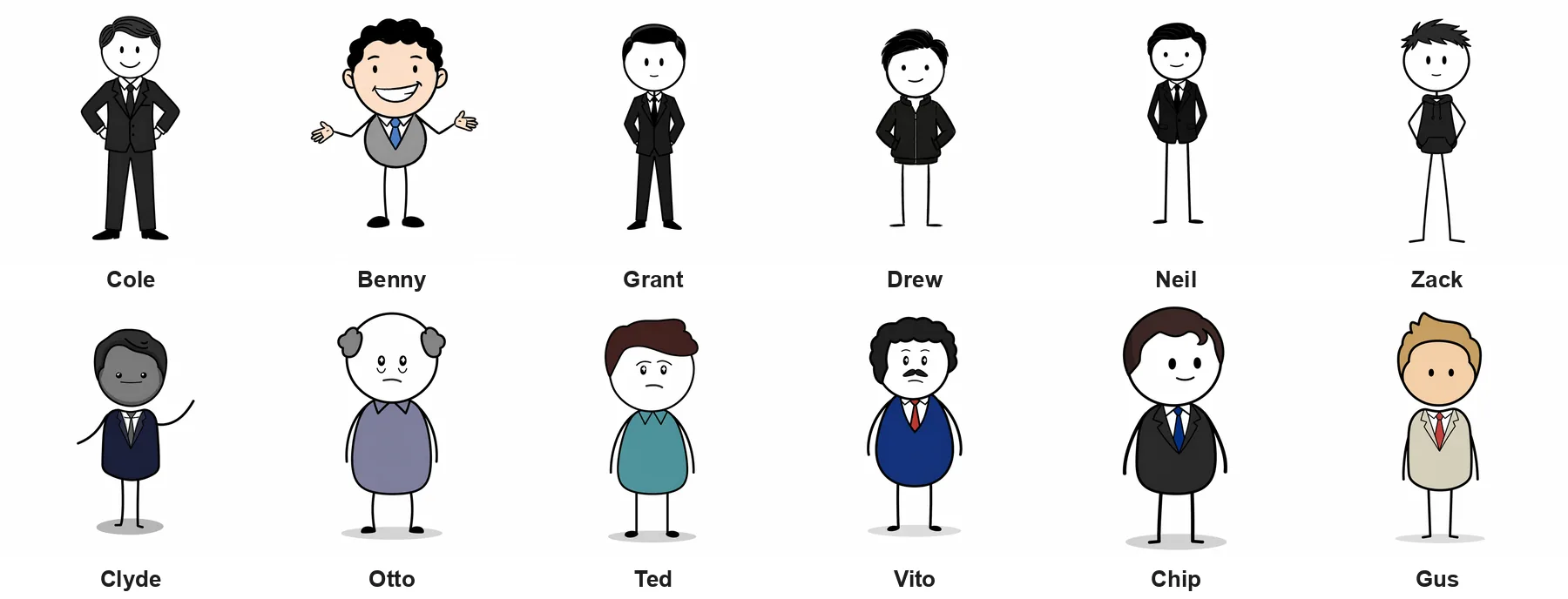
Vector Explainer has 12 built-in stick figure characters, from plain black-and-white stickmen to ones in coloured shirts and suits. The character you pick appears in every scene, and anyone else in a scene is drawn as a stick figure too, so the video keeps one look from start to finish instead of drifting into a different cartoon style halfway through.
You can also upload your own character drawing. Cliptude copies how it is built, whether it is a stick figure or a full-body cartoon, so a channel can keep its own mascot across every video. Scenes come in colour or in black and white.
Moving scenes or still scenes
With moving scenes, every illustration is animated into a short clip, so the characters and props move. This is what the sample uses, at 138 credits a finished minute.
With still scenes, the camera slowly pushes in or pans across each illustration (the Ken Burns effect). That costs 42 credits a minute with your own voiceover or 60 with an ElevenLabs voice. Still scenes suit calm, essay-style channels; moving scenes suit stories and explainers where something happens on screen.
Stick figure YouTube channels to learn from
Stick figures are not just for fight animations. Some of the biggest narrated channels on YouTube are built on them. Most of the channels below talk the viewer through a topic over simple stick figure scenes, which is the kind of video Cliptude makes; the last two animate every movement by hand. Watch a few before you plan your own channel. Subscriber counts are from each channel's YouTube page on 1 November 2026; Cliptude is not connected to any of these channels.
| Channel | Subscribers | Niche | Style |
|---|---|---|---|
| The Paint Explainer | 2.01M | Strange true stories, disasters, engineering and places you cannot visit | Narrated, plain stick figures |
| Serious History | 861K | History: battles, Rome, forgotten figures | Narrated, stick bodies with big expressive heads |
| Bernard | 393K | History told as "Why it sucks to be..." a person in an ancient society | Narrated, describes its videos as stick figure videos |
| StickTory | 147K | History told as "Your life as..." a historical figure or rank | Narrated, stick-bodied characters |
| Sticko Explains | 133K | Parenting and family psychology | Narrated, round-headed stick figures |
| StickFigure Explains | 113K | Self-improvement: habits, focus, social anxiety | Narrated, "explained by a stick figure" |
| Finance In Sticks | 19.1K | Personal finance, retirement and investing | Narrated, stick-limbed characters in coloured scenes |
| PhD. Stickman | 14.9K | Psychology and relationships | Narrated, plain stick figures |
| Alan Becker | 34.2M | Animator vs. Animation: stick figures on a computer desktop | Hand-animated, no narration |
| Stickman Kingdom | 75.6K | Stickman fights and sports | Hand-animated in FlipaClip |
Niches that fit stick figure videos
- History. "Why it sucks to be..." (Bernard) and "Your life as..." (StickTory) put the viewer inside a past life; Serious History tells battles and downfalls as stories.
- Strange true stories and disasters. The Paint Explainer turns trapped explorers, abandoned megaprojects and guarded places into ten-minute stick figure stories.
- Self-improvement. StickFigure Explains promises a fix in a set time ("in 8 minutes, explained by a stick figure"), and the simple figure keeps advice from feeling preachy.
- Psychology and relationships. PhD. Stickman lists the tricks your brain plays; one recurring character makes each habit easy to picture.
- Parenting. Sticko Explains talks to parents about their kids, with stick figures playing both sides.
- Personal finance. Finance In Sticks compares real estate with stocks and explains bonds and retirement; numbers become charts beside the characters.
- Scams and true crime explained simply, like the sample: how a scheme worked, told with an everyday analogy.
- Business and science explainers: how a company was built, or what happens inside a battery, a vaccine or a stock exchange.
A stick figure works best when the topic is about people doing things: deciding, failing, fighting, getting rich or getting caught. The figure stands in for anyone, so the viewer puts themselves in its place. These niches already have stick figure channels with large audiences, and each has a title format you can learn from:
How to make a stick figure animation with Cliptude
- Choose Vector Explainer and pick a stick figure character, or upload your own.
- Choose colour or black and white, and moving or still scenes.
- Give it a topic, or paste your script. A pasted script is used word for word.
- Pick a voice, or upload your own narration of at least 6 minutes.
- Cliptude draws every scene with your character, animates it, adds graphics, music and captions, and renders the video.
- Change any scene in the editor before you publish.
Limits to know first
- 16:9 only, 6 minutes or longer. Not for stickman GIFs, Shorts or short fight loops; a rig tool like Pivot Animator or Stick Nodes suits those better.
- You direct the story, not individual poses: there are no keyframes or joints to move.
- Charts and counters use the numbers in your script; Cliptude does not invent data.
- No free plan and no free credits.
Related
How to make 2D animations for YouTube · Explainer video maker · Script to video · Faceless YouTube video generator · Make videos with Claude over MCP · Pricing
Checked 1 November 2026. Source: Pivot Animator: home page. Source: Pivot Animator: download page. Source: Stick Nodes: stickfigure animator for Android and iOS. Source: Pencil2D: open source animation software. Source: YouTube: The Paint Explainer. Source: YouTube: Serious History. Source: YouTube: Bernard. Source: YouTube: StickTory. Source: YouTube: Sticko Explains. Source: YouTube: StickFigure Explains. Source: YouTube: Finance In Sticks. Source: YouTube: PhD. Stickman. Source: YouTube: Alan Becker. Source: YouTube: Stickman Kingdom.
Frequently asked questions
How do I make a stick figure animation?
Draw it frame by frame in an app like FlipaClip or Pencil2D, pose a stick-figure rig in Pivot Animator or Stick Nodes, or let AI draw it from a script. With Cliptude you pick a stick figure character, give it a topic or script, and get a narrated, animated video.
What is the best stick figure animation software?
It depends on what you make. For posing a stickman frame by frame on a computer, Pivot Animator; on a phone, Stick Nodes; for drawing every frame for free, Pencil2D. For a narrated YouTube video of several minutes, an AI tool like Cliptude saves drawing thousands of frames.
Can AI make stick figure animations?
Yes. Cliptude draws every scene with the same stick figure character, voices the narration and animates the scenes into a finished YouTube video.
Can Claude or ChatGPT make stick figure animations?
Not on their own: neither draws and renders a narrated video. Connected to Cliptude over MCP, either one can pick a stick figure character, write the narration, quote the price, start the video and check every scene, while Cliptude draws, voices, animates and renders it.
Can I make a stick figure animation on my phone?
Yes, with a mobile app such as Stick Nodes (Android and iOS) or a frame-by-frame drawing app such as FlipaClip.
Is there free stick figure animation software?
Pencil2D is open source and free to use, even commercially, on Windows, macOS and Linux. Cliptude has no free plan and no free credits.
Can I use my own stick figure character?
Yes. Upload a drawing of your character and Cliptude keeps it in every scene.
Can I make stickman fight animations?
Not really. Cliptude makes narrated videos, where the pictures follow the story. For choreographed fights, posing a rig frame by frame in Pivot Animator or Stick Nodes gives you the control you need.
How many scenes does a stick figure video get?
Cliptude draws a new scene for each beat of the narration. The 7-minute sample has 60 scenes, about one every 7 seconds.
Can I make black and white stickman videos?
Yes. Choose black and white and every scene is drawn in grey tones.
How long can a stick figure video be?
From 6 minutes to about an hour, in 16:9.
Can I change a scene I do not like?
Yes. Every scene opens in the editor, where you can swap or change it before you export.
What does it cost?
Moving scenes cost 138 credits a finished minute. Still scenes cost 42 with your own voiceover or 60 with an ElevenLabs voice. Plans start at $19/mo.
Compare Cliptude plans
Plans from $19/mo, priced per finished minute. Cliptude has no free plan; watch the sample videos first to judge the output.
Keep researching
Best AI video generator for YouTube · AI video price per minute (research) · AI video for marketing · Cheapest AI video generator · All alternatives